How to Add a Certificate on Android? Step by Step
To free up your hands and eyes, you can listen to the belowing podcast about this topic
Businesses today face two critical security challenges: the unauthorized access of sensitive data and security breaches. One security measure that is often overlooked is the use of digital certificates on Android devices. Certificates serve as authentication tools for users and provide network security and encrypted communication abilities, which are essential for IT professionals managing corporate devices.
Many enterprises rely on certificates to secure their Wi-Fi networks, VPNs, email services, and private APIs. However, improper configuration of certificates or untrusted certificate sources can create security vulnerabilities that put data at risk of exposure. Correct implementation and administration of certificates results in smooth authentication processes and protective data management.
This guide will explain the different types of Android certificates, why enterprises use them, and how to install them manually or via Mobile Device Management (MDM). The following article contains detailed installation procedures for certificates that meet security needs, compliance requirements, or business continuity purposes.
1Certificate Types for Android
Android devices require different types of certificates to authenticate connections while maintaining communication security. The certificates exist in three functional categories:
1.System-Level Certificates: Android devices come with these pre-installed certificates from the manufacturer to verify trusted Certificate Authorities (CAs). Enterprises may also ensure compliance with internal security policies through the enforcement of system-level certificates.
2.User-Level Certificates: These are manually installed by users and IT administrators. User-level certificates are commonly used for Wi-Fi authentication, VPN access, and email security. They also provide secure access to company resources that become accessible through user-level certificates but may need additional trust configurations.
3.Application-Level Certificates: Certain apps use their own certificates for code signing, API authentication, and privileged access. These certificates help maintain secure communication between applications and remote servers.
2Why Enterprises Need Certificates on Android
Enterprises depend on digital certificates to ensure data protection, policy compliance, and network communication. The absence of proper authentication allows unauthorized individuals to access business-sensitive resources, which produces data breaches alongside regulatory violations. Android certificates serve essential functions in these primary business situations:
1. Wi-Fi, VPN, and Email Security
Enterprises use certificates to authenticate users when they connect to corporate Wi-Fi networks, VPNs, and email systems. Organizations choose certificates as their preferred authentication tool since they offer enhanced security compared to passwords, as it reduces the chance of unauthorized access.
2. Private Certificate Authority (CA) for Internal Security
Private Certificate Authorities (CAs) are used by organizations to issue and manage digital certificates for internal use. Through private CAs, organizations can enforce strong encryption along with data integrity and regulatory compliance, ensuring that only trusted users and devices can access business applications.
3. API Communication and Secure Transactions
Many businesses implement certificates to protect the API communication between mobile apps and their backend servers. This ensures mutual authentication between Android devices and enterprise networks, minimizing the risk of man-in-the-middle (MITM) attacks and ensuring that only authorized apps can exchange data.
4. Privileged Access for Banking and Payment Security
Financial institutions depend on privileged access certificates to secure online banking and payment applications. Certificates can help to verify the legitimacy of Android devices before granting access to sensitive financial information, which ensures that transactions remain encrypted and safe from cyber threats.
By implementing these certificate-based security measures, enterprises can protect network security and sensitive data as well as prevent unauthorized access on Android devices.
3How to Install a Certificate on Android
The installation process for Android certificates depends on the certificate type together with its planned usage. Android users can install certificates either manually or through Mobile Device Management (MDM) protocols to complete the installation process.
Note: Android 7.0+ Certificate Trust Restrictions
- In Android versions 7.0 and above, security measures have been strengthened when it comes to certificate usage. User-installed certificates are no longer automatically trusted for network connections like HTTPS to enhance protection against malicious attacks. This means that in order for certificates to gain system-wide trust, they need to be installed at the system level, which necessitates root access or enforcement via Mobile Device Management (MDM).
Comparison Table: Manual vs. MDM Installation
|
Features
|
Manual Installation
|
MDM Installation
|
|---|---|---|
| Usability | Requires user interaction, best for single devices | Hands-off deployment, suitable for multiple devices |
| Time Efficiency | Can take several minutes per device | Automated, applies to all enrolled devices instantly |
| Security | Certificates installed at the user level may not be trusted system-wide | Ensures system-level trust and compliance |
| Management | Each device must be manually configured | Centralized certificate management |
| Best For | Individual users, small teams | Large enterprises, IT-managed environments |
Method 1: Manual Installation
For users who need to install certificates manually, follow these steps:
Step 1 Download the Certificate
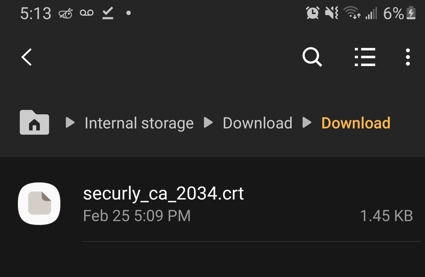
● Obtain the certificate file (.crt, .cer, or .p12) from a trusted source.
● Save it in the Downloads folder on your Android device.
Step 2 Open Certificate Installation Settings
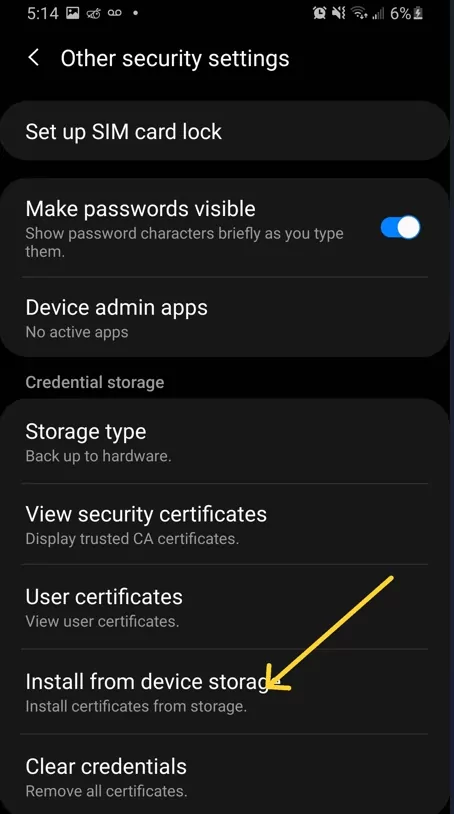
● Navigate to Settings > Security > Encryption & Credentials.
● Tap Install from storage or Install a certificate.
Step 3 Select the Certificate File
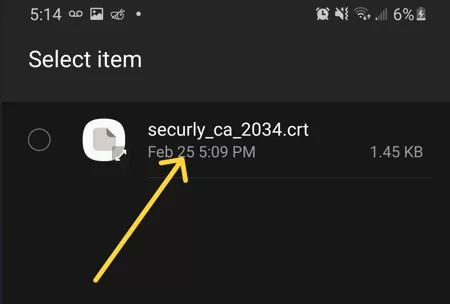
● Locate and select the downloaded certificate.
● Choose the appropriate use case (Wi-Fi, VPN, or App Authentication).
Step 4 Confirm and Complete Installation
● Follow on-screen prompts to confirm the installation.
● If required, enter a PIN or password to authorize the change.
When to Use Manual Installation
- When configuring a single device.
- For personal Wi-Fi, VPN, or email authentication.
- When an MDM solution is not available.
Method 2: Installing Certificates via MDM
For businesses handling multiple devices in their operations, MDMs help streamline the process of deploying and enforcing certificates. Here are the instructions for installing certificates using AirDroid Business:
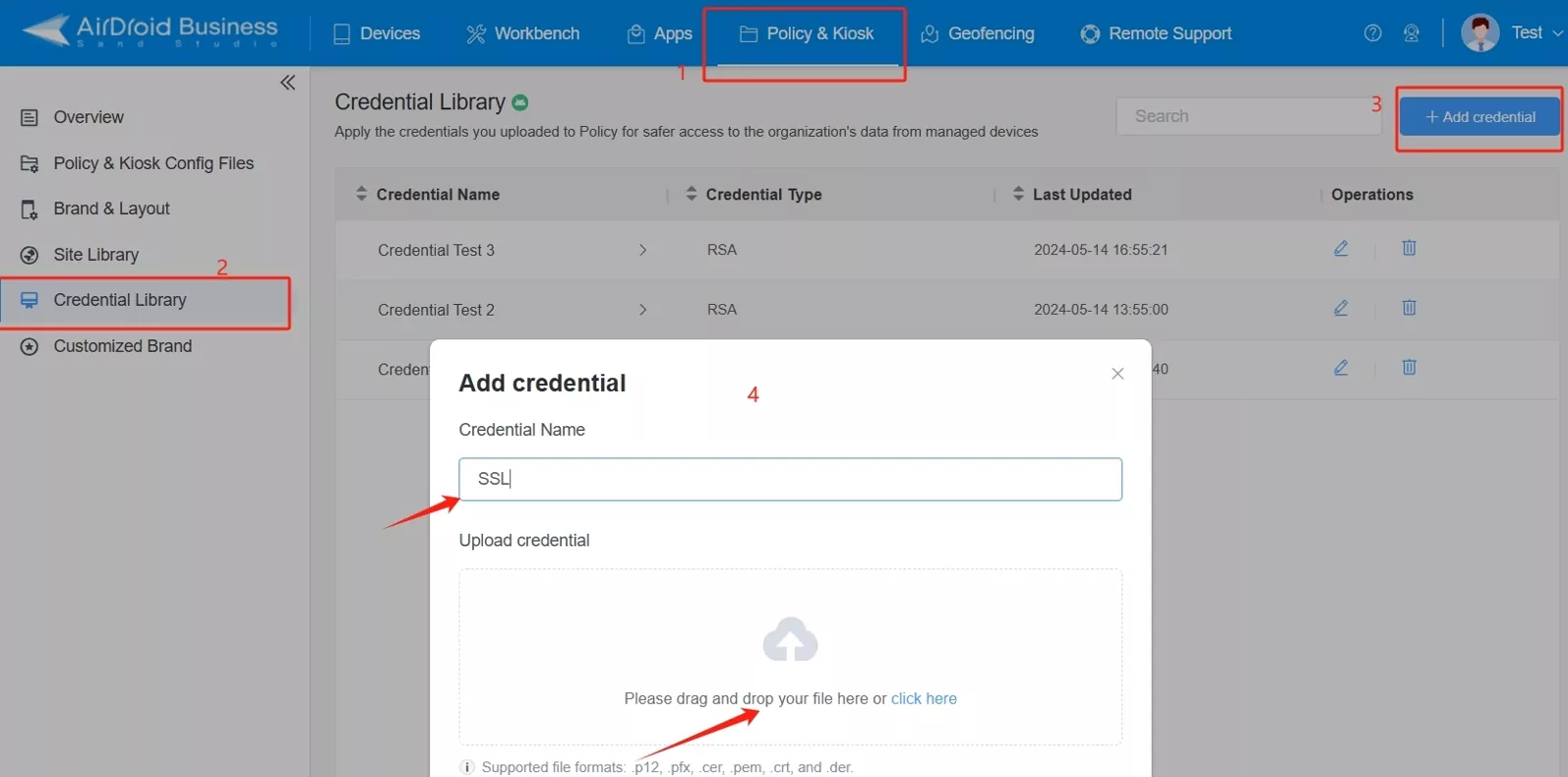
Step 1 Set Up an MDM Platform
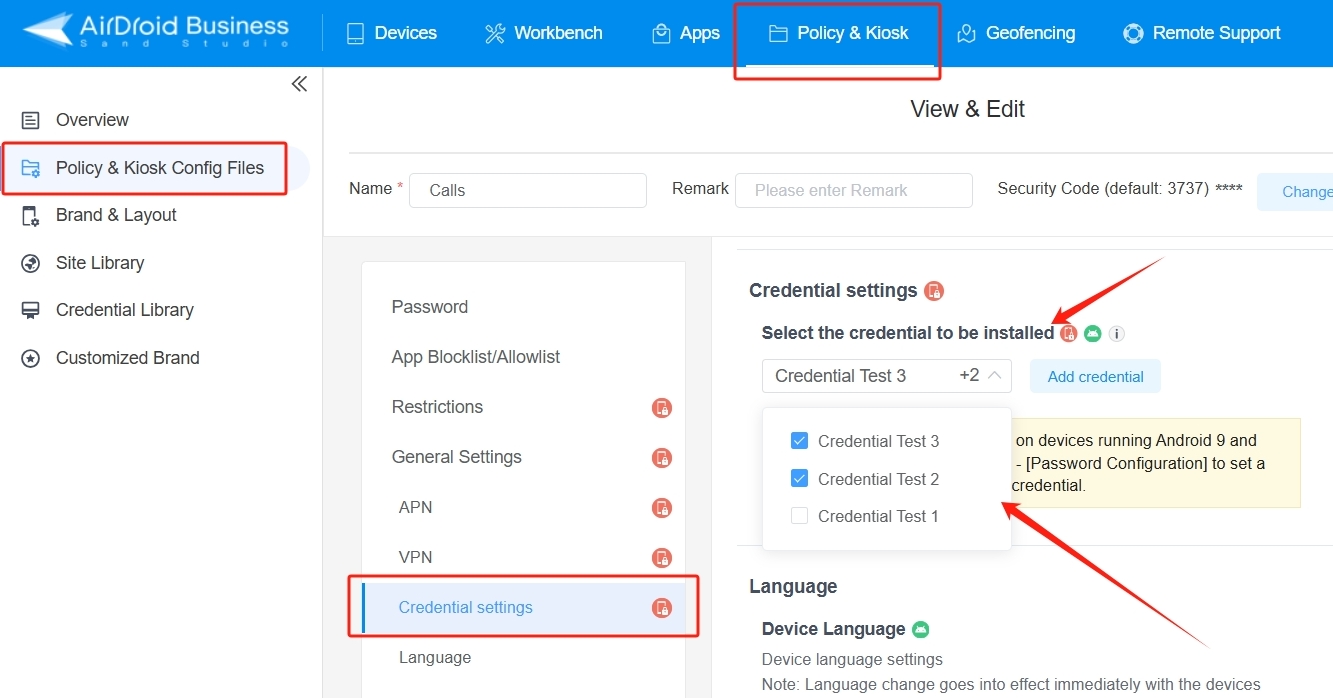
● Log in to AirDroid Business and navigate to Policy & Kiosk Config Files.
● Select Credential Library and click Add Credential.
● Upload the certificate file (.p12, .pfx, .cer, .pem, .crt, or .der format).
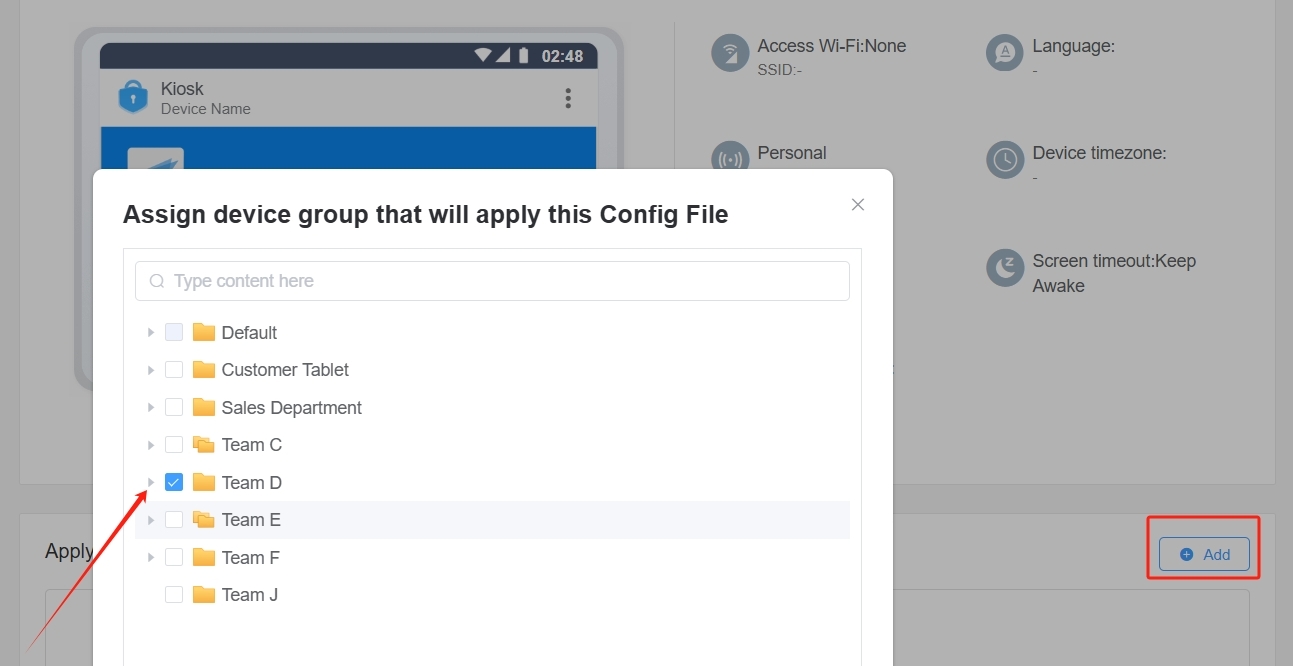
Step 2 Assign Certificate to Device Groups
● Navigate to Credential Settings within the policy editor.
● Select the certificate to install on enrolled devices.
● Apply it to specific device groups, ensuring correct distribution.
Step 3 Deploy the Certificate
● Click Save and push the policy to the devices.
● The certificate will install automatically without manual user intervention.
Benefits of MDM Installation
- System-level trust can be established without manual configuration.
- Enables centralized certificate management, which extends to multiple devices.
- Generates extra security policies to comply with regulations.
Conclusion
Digital certificates are essential for keeping Android devices safe and secure by enabling encrypted communication and blocking access. Properly installing certificates is key whether you're setting them up manually on devices or deploying them through MDM for business management to boost data protection and network security.
IT professionals should carefully assess a suitable approach according to the requirements of their organization. By adopting the right method, enterprises can uphold security measures while ensuring smooth connectivity for their users.
If your company depends on certificates for security, consider Mobile Device Management as a solution to streamline the setup and control of devices simultaneously.
1
00:00:00,000 --> 00:00:29,600
ever wonder how our phones like just work you know how they manage to keep things like our emails private and our banking apps secure yeah it's like magic right totally but today we're going behind the scenes to unlock one of the big secrets behind that magic we're diving deep deep into the world of digital certificates specifically how they work on android devices and to help guide us through this we've got a really useful resource a guide called how to add a
2
00:00:29,600 --> 00:00:46,959
certificate on android step by step it lays things out really well oh yeah that's a good one so think of this deep dive as our mission to you know cut through the tech jargon we really want to understand what these certificates are all about why they're so important for keeping our mobile lives safe and sound
3
00:00:46,959 --> 00:00:51,840
right because let's face it our phones hold well practically everything these days i know right
4
00:00:51,840 --> 00:00:57,680
everything from precious photos to like all our banking details exactly so mobile security is not
5
00:00:57,680 --> 00:01:03,119
just like a nice to have it's a must-have for everyone couldn't agree more and these digital
6
00:01:03,119 --> 00:01:08,639
certificates they're actually a fundamental part of that whole security picture they really are
7
00:01:08,639 --> 00:01:13,599
now there are two main ways these certificates can land on your android device you can install
8
00:01:13,599 --> 00:01:18,800
them manually which we'll get into later or they can be pushed out through what's called mobile
9
00:01:18,800 --> 00:01:24,559
device management you know mdm right often used by businesses to manage their devices exactly
10
00:01:24,559 --> 00:01:30,800
but first things first let's break it down what exactly are these android certificates we keep
11
00:01:30,800 --> 00:01:36,879
talking about okay so at their core think of digital certificates like digital ids you know
12
00:01:36,879 --> 00:01:42,320
for your device or for an app on your device like a digital passport kind of yeah they basically
13
00:01:42,320 --> 00:01:47,519
vouch for the authenticity of your device or an app they prove that it's really who or what it
14
00:01:47,519 --> 00:01:52,879
says it is uh so it's all about verification absolutely and that verification is super
15
00:01:52,879 --> 00:01:58,160
important for a couple of key things first it helps establish secure network connections and
16
00:01:58,160 --> 00:02:03,599
second is the foundation for something really crucial encrypted communication got it so they
17
00:02:03,599 --> 00:02:08,479
help us know who we're talking to online and make sure our conversations stay private you got it
18
00:02:08,479 --> 00:02:13,759
and the guide you shared does a nice job of like categorizing these certificates it splits them
19
00:02:13,759 --> 00:02:19,520
into three main types which i think really helps in understanding their roles three types okay
20
00:02:19,520 --> 00:02:24,080
let's hear about these different flavors of digital certificates all right so first up
21
00:02:24,080 --> 00:02:29,440
we've got system level certificates system level yeah these are the ones that are pre-installed
22
00:02:29,440 --> 00:02:34,559
on your phone right out of the box by the manufacturer oh so they're like built in from
23
00:02:34,559 --> 00:02:40,080
the start exactly yeah and their main job is to verify something called certificate authorities
24
00:02:40,720 --> 00:02:48,479
or cas for short cas i've heard of those yeah think of cas as like the trusted organizations
25
00:02:48,479 --> 00:02:53,119
that issue and verify all these digital certificates they're like the digital notaries
26
00:02:53,119 --> 00:02:57,679
of the internet okay that makes sense so these system level certificates are making sure our
27
00:02:57,679 --> 00:03:04,479
phone inherently trusts these like established authorities exactly now you might not interact
28
00:03:04,479 --> 00:03:08,399
with these system level certificates directly very often right they're kind of doing their
29
00:03:08,399 --> 00:03:14,240
thing behind the scenes right but it's interesting to note that businesses can actually use them
30
00:03:14,240 --> 00:03:20,720
to enforce their own security policies across their company devices you know ah so companies
31
00:03:20,720 --> 00:03:26,320
can leverage these certificates to make sure their devices are playing by the rules exactly okay that
32
00:03:26,320 --> 00:03:31,600
system level certificates what about the second type all right so the second type is user level
33
00:03:31,600 --> 00:03:37,119
certificates user level so i'm guessing these are the ones that we as users might actually install
34
00:03:37,119 --> 00:03:42,800
ourselves you got it these are the certificates that can be installed manually either by you
35
00:03:42,800 --> 00:03:48,880
directly or maybe by an it admin if you have a work phone you know gotcha so if my company ever
36
00:03:48,880 --> 00:03:53,919
made me download and install certificate to get my work email on my phone that was probably one
37
00:03:53,919 --> 00:03:58,800
of these user level certificates yeah most likely user level certificates are often used for stuff
38
00:03:58,800 --> 00:04:04,639
like connecting to wi-fi networks securely or setting up a vpn you know a virtual private
39
00:04:04,639 --> 00:04:09,759
network right to encrypt your internet traffic exactly and they're also commonly used for
40
00:04:09,759 --> 00:04:14,880
securing email communications and even giving you access to company resources okay so they're
41
00:04:14,880 --> 00:04:21,279
kind of like the keys to unlock various secure services i like that analogy however there is
42
00:04:21,279 --> 00:04:26,480
one thing to keep in mind with these user level certificates sometimes they might need some extra
43
00:04:26,480 --> 00:04:31,359
configuration to make sure they're freely trusted by your device for all purposes ah so it might not
44
00:04:31,359 --> 00:04:36,799
always be just a simple install and go situation right but we can get into those specifics a bit
45
00:04:36,799 --> 00:04:43,519
later for now let's move on to the third and final type application level certificates application
46
00:04:43,519 --> 00:04:49,359
level so these are tied to specific apps exactly developers use these certificates for a couple of
47
00:04:49,359 --> 00:04:54,640
really important things first code signing it's like a digital feel of approval that lets you
48
00:04:54,640 --> 00:04:59,519
know that the app you're installing is legitimate and that it hasn't been tampered with oh that's
49
00:04:59,519 --> 00:05:04,000
crucial these days with all the malware going around totally without proper code signing you
50
00:05:04,000 --> 00:05:08,640
could end up installing something nasty that's disguised as a harmless app right that's scary
51
00:05:09,200 --> 00:05:14,079
what else are these application level certificates used for another big one is api authentication
52
00:05:14,799 --> 00:05:20,720
apis are basically how apps talk to servers you know to exchange data okay so they're like the
53
00:05:20,720 --> 00:05:26,160
communication channels for apps exactly and these application level certificates make sure that
54
00:05:26,160 --> 00:05:31,519
communication is secure they prevent anyone from snooping in or messing with the data that's being
55
00:05:31,519 --> 00:05:36,320
exchanged so they're like the security guards for all that app chatter i like it so there you have
56
00:05:36,320 --> 00:05:42,480
it three types of certificates each playing a crucial though often invisible role in keeping
57
00:05:42,480 --> 00:05:46,880
our android devices secure it's like a whole security ecosystem working behind the scenes
58
00:05:46,880 --> 00:05:51,519
totally but now that we have a better grasp on what these certificates are let's zoom out a bit
59
00:05:51,519 --> 00:05:57,200
why should we you know both businesses and regular folks like us really care about them okay so for
60
00:05:57,200 --> 00:06:02,720
businesses it really comes down to a few core things protecting their data making sure they're
61
00:06:02,720 --> 00:06:07,760
following all the rules and regulations you know compliance and establishing really secure
62
00:06:07,760 --> 00:06:12,160
communication channels right because the consequences of not having strong security
63
00:06:12,160 --> 00:06:18,239
in place can be huge for companies oh absolutely think about it without proper authentication
64
00:06:18,239 --> 00:06:24,160
measures it's like leaving the front door to your business wide open yeah that's not good not at all
65
00:06:24,160 --> 00:06:29,119
you leave yourself vulnerable to data breaches which can lead to all sorts of legal headaches
66
00:06:29,119 --> 00:06:34,000
and financial nightmares and damage to their reputation too for sure okay so the stakes are
67
00:06:34,000 --> 00:06:40,720
high so where did these certificates really shine in a real world business setting the guide we
68
00:06:40,720 --> 00:06:47,119
mentioned earlier outlines some key scenarios right so first up wi-fi vpn and email security
69
00:06:47,119 --> 00:06:52,399
right you know certificates offer a way more robust way to verify users who are trying to connect
70
00:06:52,399 --> 00:06:58,000
to company networks or access their work email compared to just relying on passwords which can be
71
00:06:58,000 --> 00:07:02,880
pretty easily compromised exactly it's like adding an extra layer of armor makes sense what else
72
00:07:02,880 --> 00:07:07,920
another common scenario is companies setting up their own private certificate authority you know
73
00:07:07,920 --> 00:07:14,160
their own internal ca oh right like their own digital id system exactly this allows them to
74
00:07:14,160 --> 00:07:18,720
issue and manage their own certificates which gives them tighter control over who has access
75
00:07:18,720 --> 00:07:25,119
to what within their organization it also helps ensure strong encryption and data integrity you
76
00:07:25,119 --> 00:07:28,799
know making sure the data hasn't been tampered with so it's like having their own internal
77
00:07:28,799 --> 00:07:34,079
security checkpoint for all their digital interactions i like that analogy and then
78
00:07:34,079 --> 00:07:40,959
there's api communication and secure transactions a lot of businesses rely on apis for their apps
79
00:07:40,959 --> 00:07:45,760
to talk to their servers you know to exchange all sorts of data makes sense and certificates play a
80
00:07:45,760 --> 00:07:51,040
big role in making sure the communication is locked down tight we're talking mutual authentication
81
00:07:51,040 --> 00:07:55,519
here meaning both the app on your phone and the server it's talking to have to prove their
82
00:07:55,519 --> 00:08:00,799
identities to each other like a double check system precisely this helps prevent eavesdropping
83
00:08:00,799 --> 00:08:06,480
impersonation and those nasty man-in-the-middle attacks man-in-the-middle sounds scary it is it's
84
00:08:06,480 --> 00:08:11,839
basically when someone intercepts the communication between your phone and the server you know trying
85
00:08:11,839 --> 00:08:17,519
to steal data or inject malicious code yikes okay so certificates are helping to shut down those
86
00:08:17,519 --> 00:08:23,600
avenues of attack for sure and then finally a huge one especially for the financial industry
87
00:08:23,600 --> 00:08:31,119
privileged access for banking and payment security ah yes when it comes to money matters security is
88
00:08:31,119 --> 00:08:37,039
paramount absolutely banks and other financial institutions rely heavily on certificates
89
00:08:37,039 --> 00:08:42,960
to verify that the devices accessing sensitive financial info are legitimate so they're making
90
00:08:42,960 --> 00:08:48,640
sure it's really you trying to access your account not some imposter right and of course
91
00:08:48,640 --> 00:08:54,159
certificates are crucial for keeping all those transactions encrypted and safe from prying eyes
92
00:08:54,880 --> 00:08:59,919
so it's not just about securing our wi-fi it's about building this whole chain of trust for all
93
00:08:59,919 --> 00:09:04,640
sorts of sensitive interactions now you mentioned earlier that this isn't just a business thing that
94
00:09:04,640 --> 00:09:08,719
regular folks should care about this stuff too oh definitely the same principles apply whether you're
95
00:09:08,719 --> 00:09:13,679
a huge corporation or just someone using their phone to check email and do some online shopping
96
00:09:13,679 --> 00:09:18,479
okay so even though we might not be setting up our own private cas the basic need to protect our
97
00:09:18,479 --> 00:09:23,440
personal data is the same absolutely you want to make sure your communications are secure
98
00:09:23,440 --> 00:09:27,679
especially when you're on public wi-fi and you want to avoid becoming a target for all those
99
00:09:27,679 --> 00:09:33,520
nasty cyber threats out there right so even having a basic understanding of how these certificates
100
00:09:33,520 --> 00:09:39,919
work can make us more aware and more careful about our own online habits for sure knowledge is
101
00:09:39,919 --> 00:09:45,119
power when it comes to security couldn't agree more all right so we've covered what certificates
102
00:09:45,119 --> 00:09:51,039
are and why they matter but now let's get practical how do they actually end up on our android devices
103
00:09:51,039 --> 00:09:56,559
okay so as we touched on earlier there are two main methods manual installation and installation
104
00:09:56,559 --> 00:10:02,000
through mdm right the two paths to certificate town i like it yeah but before we jump into those
105
00:10:02,000 --> 00:10:06,640
there's an important change that came with android 7.0 that's worth mentioning oh a change
106
00:10:06,640 --> 00:10:11,679
in the certificate game yeah pretty big one so before android 7.0 if you installed a certificate
107
00:10:11,679 --> 00:10:17,359
yourself it was pretty much trusted by your device for everything but starting with android 7.0
108
00:10:17,359 --> 00:10:22,559
things got a bit more strict user installed certificates are no longer automatically
109
00:10:22,559 --> 00:10:27,440
trusted for things like secure websites you know those that start with https
110
00:10:27,440 --> 00:10:32,960
ah so they clamp down a bit on what those user installed certificates can do exactly now to have
111
00:10:32,960 --> 00:10:38,000
system-wide trust a certificate generally needs to be installed at the system level system level
112
00:10:38,000 --> 00:10:42,320
yeah and there are a couple of ways to do that you could root your device but that's kind of a
113
00:10:42,320 --> 00:10:47,840
techie thing that most people don't do and it can actually open up security risks if not done
114
00:10:47,840 --> 00:10:53,280
properly right so not really the recommended route for most folks nope the other way is through mdm
115
00:10:53,840 --> 00:10:58,719
you know those mobile device management systems we talked about earlier ah so mdm can handle that
116
00:10:58,719 --> 00:11:05,359
system level installation exactly and this change in android 7.0 was a good thing overall it was
117
00:11:05,359 --> 00:11:10,400
meant to prevent bad actors from tricking people into installing shady certificates so it added an
118
00:11:10,400 --> 00:11:15,119
extra layer of protection for users okay so that's a crucial point to remember just because you
119
00:11:15,119 --> 00:11:20,479
install a certificate yourself doesn't automatically mean it's fully trusted by your device right
120
00:11:20,479 --> 00:11:25,760
especially when it comes to sensitive stuff like secure web browsing now the guide you shared does
121
00:11:25,760 --> 00:11:30,960
a great job of comparing manual and mdm installation you know laying out the pros and cons of each
122
00:11:30,960 --> 00:11:36,719
it's a really helpful table it is so let's break down some of those key differences starting with
123
00:11:36,719 --> 00:11:43,280
like usability how user-friendly is each method okay so manual installation is really designed
124
00:11:43,280 --> 00:11:48,880
for individual devices it's something you do yourself step by step on each phone or tablet
125
00:11:48,880 --> 00:11:54,799
right so it's a hands-on approach exactly yeah mdm on the other hand is all about automation
126
00:11:54,799 --> 00:12:00,000
it's meant for managing lots of devices at once like a whole fleet of company phones ah so it's
127
00:12:00,000 --> 00:12:04,799
like mass certificate deployment precisely no need to fiddle with each device individually okay
128
00:12:04,799 --> 00:12:09,679
that makes sense for businesses what about time efficiency i'm guessing manually installing
129
00:12:09,679 --> 00:12:14,719
certificates on like a hundred devices would be a nightmare it would be a real time suck
130
00:12:15,359 --> 00:12:20,000
you're looking at several minutes per device depending on how tech savvy the person is
131
00:12:20,000 --> 00:12:25,280
right and if you've got hundreds or even thousands of devices to manage yeah that's not a good use
132
00:12:25,280 --> 00:12:31,119
of anyone's time mdm because it's automated can push out certificates to all enrolled devices
133
00:12:31,119 --> 00:12:35,919
super quickly so it's a huge time saver for it departments absolutely and then of course there's
134
00:12:35,919 --> 00:12:40,320
the big one security right because that's what these certificates are all about exactly and this
135
00:12:40,320 --> 00:12:45,599
is where mdm really shines especially considering those android 7.0 changes we talked about right
136
00:12:45,599 --> 00:12:50,320
the whole system level trust thing yeah so certificates you install manually might not
137
00:12:50,320 --> 00:12:56,640
have that system-wide trust which can create security gaps ah so it might not be as effective
138
00:12:56,640 --> 00:13:02,080
in some cases right mdm however ensures that certificates are installed with that system level
139
00:13:02,080 --> 00:13:08,400
trust which is much more robust and helps maintain consistent security across all those managed
140
00:13:08,400 --> 00:13:13,280
devices so it's like tightening up the security net across the board okay what about managing
141
00:13:13,280 --> 00:13:18,479
these certificates once they're installed like what if a certificate expires or needs to be
142
00:13:18,479 --> 00:13:23,520
revoked for some reason with manual installation you have to go back and make those changes on each
143
00:13:23,520 --> 00:13:29,840
device individually ah so it's back to that manual grind yep but with mdm you've got centralized
144
00:13:29,840 --> 00:13:35,679
management it admins can update revoke or do pretty much anything with those certificates
145
00:13:35,679 --> 00:13:40,799
from a single console so it's like having a master control panel for all your certificates
146
00:13:40,799 --> 00:13:46,080
exactly and that level of control is a huge advantage for security and efficiency right so
147
00:13:46,080 --> 00:13:52,000
based on all that what does it make sense to use each method manual installation is really best for
148
00:13:52,000 --> 00:13:57,200
individuals you know for your own personal device or maybe for really small teams it's also the way
149
00:13:57,200 --> 00:14:02,880
to go if you don't have access to an mdm system makes sense but for larger organizations mdm is
150
00:14:02,880 --> 00:14:07,679
definitely the way to go it's much more efficient more secure and just makes life easier for it
151
00:14:07,679 --> 00:14:12,799
okay that's clear so let's dive a bit deeper into the actual steps involved in each method
152
00:14:12,799 --> 00:14:16,880
let's start with the manual process all right so the guide lays out the steps pretty clearly
153
00:14:17,679 --> 00:14:23,039
first you need to download the certificate file it'll usually have an extension like dot crt
154
00:14:23,919 --> 00:14:30,000
dot seer or dot p12 and i'm guessing you want to save it somewhere easy to find yeah the downloads
155
00:14:30,000 --> 00:14:35,520
folder is usually a good spot then you need to head over to the certificate settings on your phone
156
00:14:35,520 --> 00:14:40,559
oh so we're going on a little adventure through the settings menus kind of yeah you'll probably
157
00:14:40,559 --> 00:14:45,280
have to go to the security section then look for something like encryption and credentials
158
00:14:45,280 --> 00:14:51,679
and then tap on install from storage or install a certificate the exact wording might be a bit
159
00:14:51,679 --> 00:14:56,159
different depending on your phone but that's the general area okay so a bit of a treasure hunt yeah
160
00:14:56,159 --> 00:15:00,000
but once you find the right spot you just select the certificate file you downloaded
161
00:15:00,640 --> 00:15:05,760
then you'll probably be asked how you want to use the certificate you know for wi-fi vpn
162
00:15:05,760 --> 00:15:10,640
app authentication whatever right to make sure it's configured correctly exactly and finally
163
00:15:10,640 --> 00:15:15,760
you just confirm the installation you'll likely have to enter your pin or password to authorize
164
00:15:15,760 --> 00:15:21,039
it so it's a few steps but nothing too complicated for someone who's comfortable navigating their
165
00:15:21,039 --> 00:15:27,359
phone's settings exactly and as the guide points out this is really the best method for when you're
166
00:15:27,359 --> 00:15:33,200
setting up your own personal phone for your home wi-fi or your email or if you just don't have mdm
167
00:15:33,200 --> 00:15:39,119
makes sense now let's switch gears and talk about mdm installation the guide uses air droid business
168
00:15:39,119 --> 00:15:44,239
as an example yeah that's a popular mdm platform so if you're an organization managing a bunch of
169
00:15:44,239 --> 00:15:50,479
android devices how does the whole mdm certificate dance work okay so first and foremost you need to
170
00:15:50,479 --> 00:15:55,039
have your mdm platform up and running with air droid business you'd log into their web portal
171
00:15:55,599 --> 00:16:01,520
and navigate to a section called policy and kiosk config files and within that there is a credential
172
00:16:01,520 --> 00:16:06,719
library credential library sounds important it is that's where you upload your certificate file
173
00:16:06,719 --> 00:16:11,440
air droid business supports a bunch of different certificate formats so you've got some flexibility
174
00:16:11,440 --> 00:16:17,119
there okay so the it admin uploads the certificate what's next next you need to decide which devices
175
00:16:17,119 --> 00:16:22,159
get that certificate within the mdm platform there are usually credential settings where you
176
00:16:22,159 --> 00:16:28,080
can pick and choose which devices or groups of devices get that specific certificate oh so you
177
00:16:28,080 --> 00:16:33,280
can be super specific about who gets what exactly no need to blast it out to everyone if only certain
178
00:16:33,280 --> 00:16:39,039
departments need it and finally you just deploy the policy deploy so it's like hitting the send
179
00:16:39,039 --> 00:16:44,239
button for certificates i like that once you deploy the certificate automatically installs on
180
00:16:44,239 --> 00:16:49,440
all the targeted devices no need for the users to do anything so it's all seamless and behind the
181
00:16:49,440 --> 00:16:56,080
scenes totally and as the guide points out this is one of the big advantages of mbm you get system
182
00:16:56,080 --> 00:17:01,200
level trust without all the manual hassle you've got centralized control over all your certificates
183
00:17:01,200 --> 00:17:06,160
and you can even set up extra security policies to meet all those compliance requirements so it's a
184
00:17:06,160 --> 00:17:11,599
win-win for security and for making the it team's lives easier well we've covered a lot of ground
185
00:17:11,599 --> 00:17:16,800
today from what these digital certificates are to why they matter for both businesses and
186
00:17:16,800 --> 00:17:21,839
individuals to the different ways that can be installed it's a pretty deep rabbit hole but an
187
00:17:21,839 --> 00:17:27,680
important one totally and if there's one key takeaway from all this it's that digital certificates are
188
00:17:27,680 --> 00:17:32,959
absolutely essential for securing our android devices they're the foundation for encrypted
189
00:17:32,959 --> 00:17:38,640
communication for controlling access to sensitive stuff and for protecting us from a whole range of
190
00:17:38,640 --> 00:17:42,959
cyber threats couldn't have said it better myself and in a world where everything's getting more
191
00:17:42,959 --> 00:17:47,680
connected and cyber threats are getting more sophisticated understanding this stuff is more
192
00:17:47,680 --> 00:17:53,599
important than ever it's not just about being tech savvy it's about being security savvy exactly
193
00:17:54,319 --> 00:18:01,359
so as we wrap up this deep dive here's a final thought to chew on given how sneaky and sophisticated
194
00:18:01,359 --> 00:18:05,599
these cyber attacks are getting what other security measures might we be overlooking
195
00:18:06,239 --> 00:18:10,959
what else can we do both as individuals and as organizations to really batten down the hatches
196
00:18:10,959 --> 00:18:16,079
and stay safe out there it's a question worth asking ourselves regularly and maybe it's time
197
00:18:16,079 --> 00:18:20,640
to take a fresh look at our own security habits you know see if there are any gaps we can plug
198
00:18:20,640 --> 00:18:26,560
and maybe even consider exploring mdm solutions even for smaller businesses or families with
199
00:18:26,560 --> 00:18:31,839
multiple devices it might be more relevant than we think definitely food for thought thanks for
200
00:18:31,839 --> 00:18:36,479
joining us for the security pack deep dive stay safe out there everyone until next time




Leave a Reply.