How to Automatically Forward Text Messages to Another Phone
Almost everyone occasionally require SMS forwarding. You might want to forward text messages to a different phone number or email when you have multiple devices, or when you want to keep a back of important conversation, or anything else. On that note, this article explains how to automatically forward text messages to another phone.
Set up Automatic Text Message Forwarding on iPhone
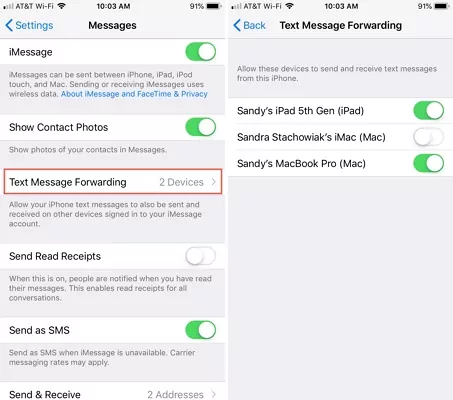
iPhone boasts a built-in setting called "Text Message Forwarding," which enables you to receive and send text messages from any of your Apple devices with the same ID signed in. Here's how you can automatically forward a message on iPhone:
- Step 1.Go to "Settings" > "Messages" on your iPhone.
- Step 2.Make sure the "iMessage" option is on.
- Step 3.Tap "Text Message Forwarding."
- Step 4.Then, all your Apple ID-connected devices will be listed on the screen. Just choose the person to whom you want to forward SMS messages.
The methods introduced above only support messaging between iPhones. If you want to automatically forward SMS messages from an iPhone to an Android device, unfortunately, that is not possible.
Set up Automatic Text Message Forwarding on Android
If you're an Android user, you need more time, as the integrated Message app does not provide automatic forwarding of text messages. Even so, you can still utilize third-party apps to do so.
To save you time, we've tested apps and list 2 apps you can experience. One is SMS Forwarder and the other is AirDroid Parental Control.
SMS Forwarder
SMS Forwarder is an app that can synchronize incoming and outgoing SMS between multiple devices. But some advanced features need a subscription. Moreover, the biggest downside of this app is there are many ads popping up.
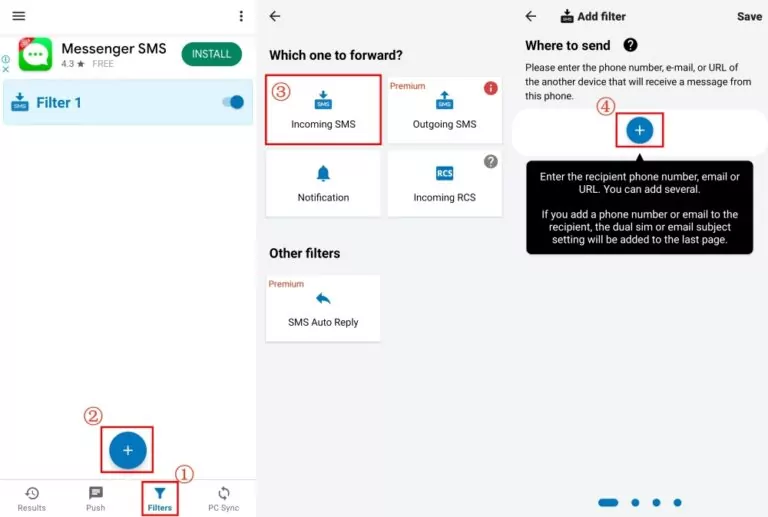
- Step 1.Install SMS Forwarder from the Play Store.
- Step 2.On the "Filters" tab, tap "+."
- Step 3.Then, select "Incoming SMS."
- Step 4.Tap "+" again to input the recipient's phone number or email.
- Step 5.Press "Save" and make sure this filter is on. Then, you are managed to automatically forward messages to another phone.
AirDroid Parental Control
To automatically forward text messages on an Android phone to another iPhone or Android, parents can use AirDroid Parental Control, which can sync incoming messages and receive their child's texts, calls, emails, and notifications in real-time. Not only that, the chat messages from social media can be also forwarded.
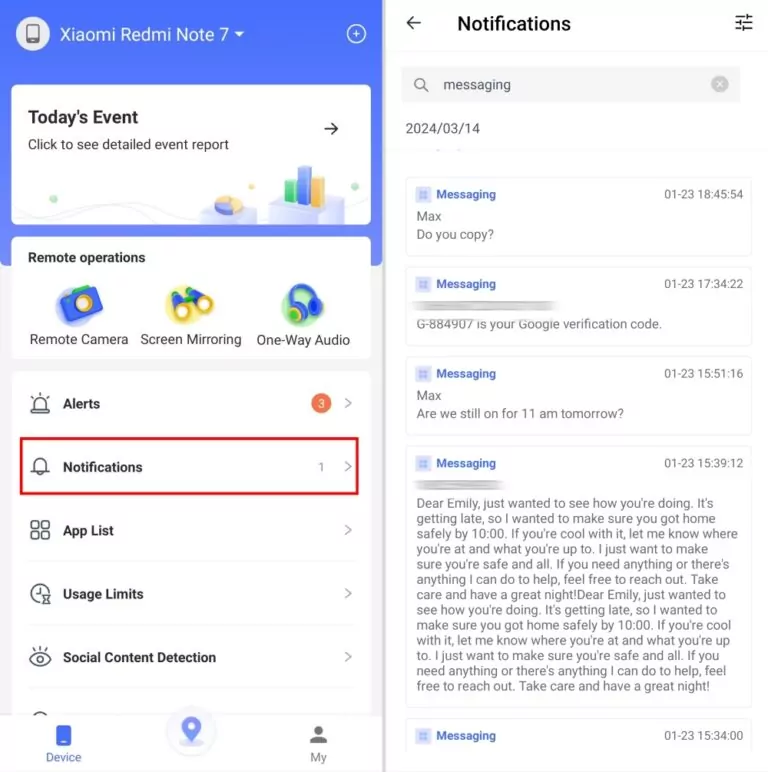
- Step 1.Install AirDroid Parental Control and follow the on-screen instructions to set it up.
- Step 2.Tap "Notifications" on the parental dashboard.
- Step 3.Search for "Messaging" to read all SMS from the target phone.
What's more, this app has a web version so that you can get forwarded messages online!
Video Tutorial: Automatically Forward Text Messages to Another Phone
Forward Text Messages to Another Number/Email
Whether you're using an iPhone or Android, you can directly forward SMS to email or another number without third-party apps. Follow the quick steps below:
On iPhone:
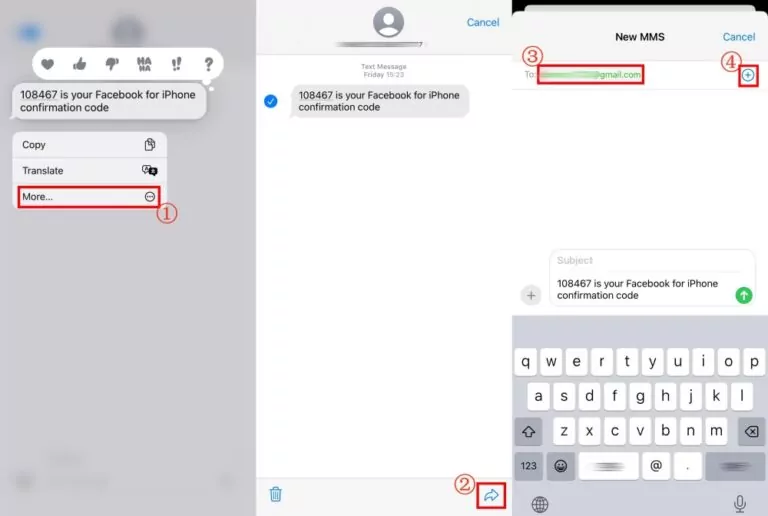
- Step 1.Launch the Message app and open the conversion.
- Step 2.Long press the message you want to forward.
- Step 3.Tap "More" and then the "arrow" icon.
- Step 4.Enter the target number or email address and "Send."
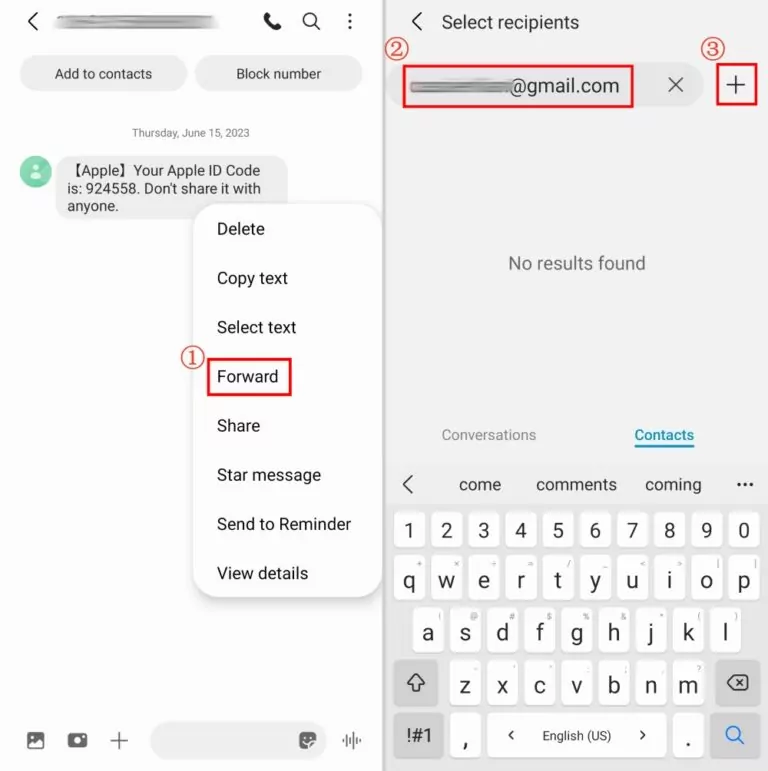
On Android:
- Step 1.Tap and hold the messages you'd like to forward.
- Step 2.Select "Forward" and type the recipient's phone number or email.
- Step 3.Tap "Send" to complete.
Divert Messages for Other Messaging Services
Are you using other messaging services, like WhatsApp, Messenger, or any other? If yes, all these apps allow you to divert messages to another contact. We select the most popular mobile messenger apps according to the statistics in 2024 and provide the how-to steps. Now, let's dive in!
How to forward messages from WhatsApp
- 1.On WhatsApp, open a conversation and long-press the message.
- 2.Tap the "arrow" icon in the top-right corner.
- 3.Select the contact in your WhatsApp list.
- 4.Then, tap the green button, which means "Send."
How to forward a message in Messenger
- 1.Tap and hold the message till a menu appears.
- 2.Tap "More" and then "Forward."
- 3.Hit "SEND" next to the recipient you want to forward.
How to forward Telegram messages
- 1.Long tap the text you need to forward on Telegram.
- 2.Select "Forward" and choose a person.
- 3.Tap the blue button in the lower-right corner.
How to forward Snapchat messages
- 1.Press and hold on to the messages in "Chat."
- 2.Tap "Forward Message."
- 3.Select a friend and click "Okay."





Leave a Reply.