App Management Service Explained | AirDroid Business MDM 11
Are you worried about remote app updates? Imagine a chain of self-service kiosks scattered across different locations, all relying on a single app. Coordinating updates for these devices can be a nightmare, with each device requiring attention and potential downtime.
Businesses need a dependable solution to streamline these updates. An MDM solution with advanced app management can automate updates, ensure compatibility, and keep your managed kiosks running smoothly, no matter where they are.
Key Features of AirDroid Business App Management
1. App Library
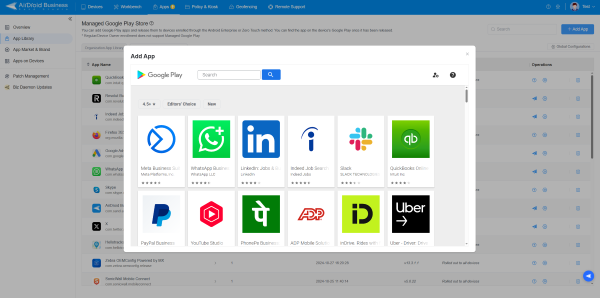
Organization App Library: AirDroid Business offers an organization App Library that allows businesses to create their own private app store. This feature enables users to upload custom applications or web apps for deployment on managed devices.
Managed Google Play Store: Additionally, the Managed Google Play Store allows organizations to customize their Google Play experience, restricting device users to download only approved apps while managing application update rules and permissions.
2. App Update & Installation
AirDroid Business enhances app deployment with several features:
Bulk Distribution by Device Group: Allowing organizations to install and update applications across multiple devices remotely.
Custom App Information: Display customized app names, descriptions, and icons on managed devices, enhances user experience on managed devices.
Web App Display Settings: Choose between full-screen, simplified, or standard display styles for web apps.
Test Release: Prior to full deployment, test app versions on up to 10 devices, allowing for rollbacks in case of compatibility issues.
Staged Rollout: Gradually roll out updates based on percentage, region, device information, or groups.
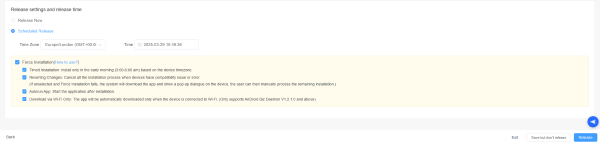
Force & Scheduled Installation: Install apps without user intervention, ensuring a seamless experience and eliminating the need for user intervention during app updates.
3. App Uninstallation
Remote Bulk Uninstallation: Remote bulk uninstallation of applications ensures that organizations can efficiently manage their app inventory, removing unnecessary or outdated applications from all managed devices.
4. App Monitoring & Analysis
Alerts: The monitoring capabilities of AirDroid Business enable organizations to set alerts based on app usage metrics, such as traffic consumption and application status.
AirDroid Business: Customer Success Stories in Application Management Services
Streamlining Fleet Operations with Remote App Management

Quick Overview: A fleet control services company provides GPS systems and travel management services for over 800 buses transporting personnel for a major mining company. They sought to streamline app updates for their bus tablets.
Business Challenges: Managing application updates across 800 devices proved challenging. The company required a solution that allowed remote updates while maintaining a locked-down kiosk mode to prevent user modifications.
Solution: AirDroid Business enabled remote app updates and kiosk mode lockdown, ensuring that the application remained functional and secure across all devices. This streamlined the update process significantly.
Efficient App Management for Foodservice Logistics

Quick Overview: Flanagan Foodservice's IT department supports a food distribution business responsible for delivering restaurant supplies. They needed a solution to manage app installations and device monitoring for their delivery drivers.
Business Challenges: Previously, the company lacked an MDM solution, requiring all apps to be recalled for updates, which was inefficient and time-consuming.
Solution: With AirDroid Business, Flanagan Foodservice utilized the app library to push applications directly to devices, facilitating seamless updates. They integrated various applications, including MobileLink for proof of delivery, Dayforce for HR tracking, and Geotab for fleet management, enhancing operational efficiency.
Enhancing Emergency Services with Effective App Management
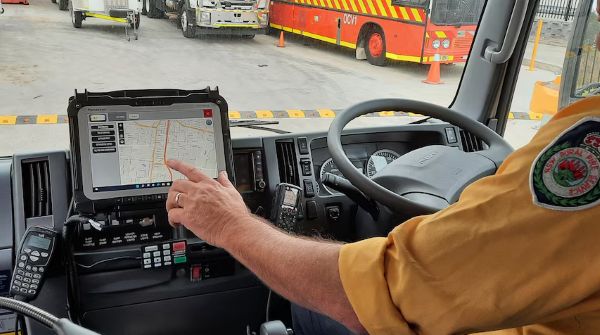
Quick Overview: The fire department of a province in the Netherlands manages 120 devices used for navigation by fire truck drivers. They needed an efficient way to update apps and monitor device inventory.
Business Challenges: Keeping the navigation systems updated and ensuring compliance with operational standards was essential for effective emergency response.
Solution: AirDroid Business provided a quick deployment package that allowed for remote installation of necessary apps like Safety NAV, contact applications, and network signal monitoring tools. This ensured that all devices were up-to-date and functioning optimally.
Conclusion
AirDroid Business's App Management features empower organizations across various industries to effectively manage their applications, ensuring seamless updates, secure environments, and enhanced productivity. The success stories of diverse clients illustrate the versatility and effectiveness of AirDroid Business in overcoming unique app management challenges.






Leave a Reply.